
Draft. This manual is new and still growing. If something here does not match what you see in the software, the software is right — tell us and we will fix the page.
Import a mesh from another tool
Bring in a volume mesh built elsewhere — Fluent, Gmsh, STAR-CCM+, I-deas and the rest — instead of generating one here. The case keeps its physics, its numerics and its run settings; only the mesh comes from outside.
Steps
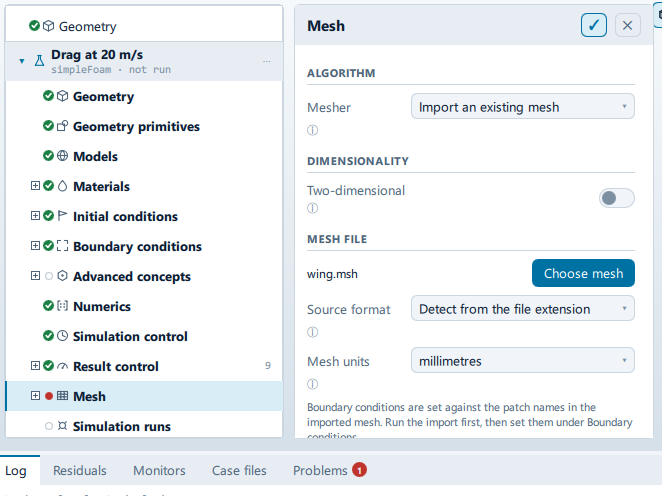
Select Mesh. Set Mesher to
Import an existing mesh. The Mesh file section appears below Dimensionality.Press Choose mesh. The dialog's filters are built from the converters this build actually has, not from a fixed list, so what it offers is what it can read. Until a file is picked the row reads "No mesh chosen."
Leave Source format at
Detect from the file extensionunless you have a reason not to. Detection reads the head of the file first and only falls back to the extension —$MeshFormator$NODmeans Gmsh,# vtk DataFilemeans VTK, a leading(0or(1means Fluent,PROSTARmeans STAR. Set it by hand for.msh, which Fluent, Gmsh and others all use for completely different formats; picking by extension alone is how a Gmsh mesh gets handed to the Fluent reader and comes back the right size and made of garbage cells.Set Mesh units to what the numbers in the file are in:
metres,millimetres,centimetres,inchesorfeet. Get this wrong and the case still meshes, still runs and still reports — a millimetre mesh left atmetressolves a model a thousand times too big with a straight face.Press Model → MESH → Generate mesh. That is what runs the conversion; nothing is read from the file until you do.
The same thing from the command line is --import-mesh=<file>[:scale], where
the scale is the factor to metres: --import-mesh=box.msh:0.001 reads a
millimetre mesh. It sets the mesher for you.
What the import actually does
In order:
- Anything already in
constant/polyMeshis removed, and so is any mesh sitting in a time directory — a mesh in0/polyMeshshadowsconstantentirely, and leaving one there scales the previous mesh and leaves the new one at its original size. - The converter runs on the file.
transformPoints -scaleruns, when Mesh units is anything butmetres.- Any Mesh → Operations you have added run, exactly as they would on a generated mesh.
checkMesh -allGeometry -allTopologyruns, and Quality reports it.
blockMesh and snappyHexMesh do not run. Neither does anything under
Refinements or Boundary layers: the mesh is converted, not generated, so
those settings have nothing to act on.
What is adopted, and what you set up afterwards
Patches. The patch names come out of the converted
constant/polyMesh/boundary and become the rows under Boundary
conditions — the Log says "Imported n patches. Set their boundary conditions
under Boundary conditions." Any boundary-condition row naming a patch the mesh
does not have is dropped, and the case's usual inlet/outlet/body/
farfield starting set is not seeded at all: an imported mesh brings its own
names and inventing four more would write field files against patches that do
not exist.
Fields. The 0/ field files are held back until the patch names are known
and written immediately afterwards — "Wrote the field set against the imported
patches." This is why the boundary conditions cannot be set before the first
import: there is nothing yet to set them on.
Patch types. OpenFOAM builds wall functions from the mesh's own patch type,
and a converter has no idea which patches are walls. The wall/patch distinction
is written into constant/polyMesh/boundary from the boundary conditions as the
import starts — so it follows a subsequent import rather than the first one.
Set the conditions, then generate again, and the types go in.
Geometry. Nothing. An imported mesh satisfies the case's need for a body on its own, so the Geometry step stays empty and the "no body" problems do not appear. There is no surface to refine towards and no CAD to edit.
The cell limit is judged on the converted mesh's own count, from
checkMesh — so a mesh over your tier's limit is refused after conversion
rather than before it.
Formats
Fourteen converters are wired up, and only those present in this runtime are offered:
| Format | Extensions |
|---|---|
| Fluent / ANSYS mesh | .msh, .cas |
| Fluent 3D mesh | .msh |
| Gmsh | .msh |
| STAR-CCM+ / STAR-CD | .cel, .vrt, .bnd |
| CFX-4 | .geo |
| I-deas universal | .unv |
| ANSYS Prep7 | .ans |
| Plot3D | .grd, .p3d |
| Netgen neutral | .mesh |
| TetGen | .ele, .node |
| GAMBIT neutral | .neu |
| VTK unstructured | .vtk |
| EnSight | .case |
Generic .msh |
.msh |
These are volume-mesh converters. A surface file — STL, OBJ and the rest — is not one of these; it is geometry, and it goes in through Geometry → Import geometry instead.
STAR-CCM+ and TetGen read a set of files that share a stem: .cel, .vrt and
.bnd for the first, .ele and .node for the second. Pick any one of the
set — the stem is what the converter is given, and the rest have to sit beside
it.
Check it worked
- The Log names the converter: "Converting … with
gmshToFoam." - Boundary conditions lists the patch names from the other tool, and nothing else.
- Quality shows the
checkMeshresult. A mesh that another tool called good can still fail here — the checks run are the full geometry and topology ones, not the cheap summary.
If it will not convert
Two messages, both meaning nothing in this build recognises the file:
- "No converter in this build reads <file>. Choose the source format explicitly." — a Problems entry, raised as you set the case up.
- "No converter in this build can read <file>. Choose the format explicitly under Mesh." — the Log line, written when the run tries to convert.
Same remedy: set Source format by hand, or export from the other tool in one of the formats above. Both are indexed in Troubleshooting.