
Draft. This manual is new and still growing. If something here does not match what you see in the software, the software is right — tell us and we will fix the page.
Report
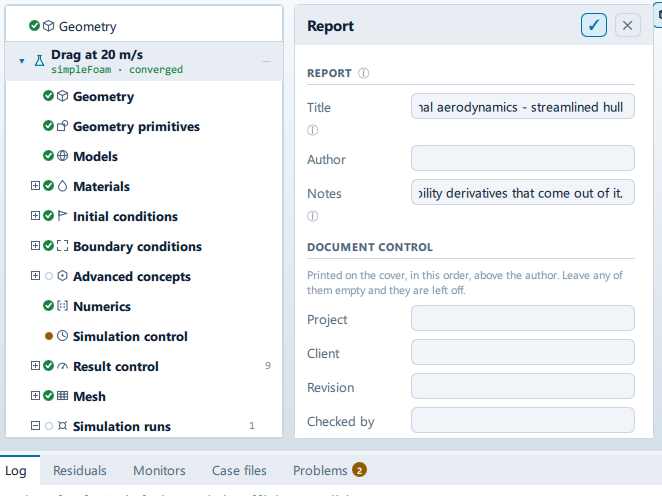
Where it is
Setup tree: Report
Controls
Report
Title
- Control: value (
ValueField) - Default: empty
- Bound to:
ReportState.title - Value modes: none (plain entry)
Blank uses the case name.
Author
- Control: value (
ValueField) - Default: empty
- Bound to:
ReportState.author - Value modes: none (plain entry)
Notes
- Control: value (
ValueField) - Default: empty
- Bound to:
ReportState.notes - Value modes: none (plain entry)
Appears under the case summary.
Document control
Project
- Control: value (
ValueField) - Default: empty
- Bound to:
ReportState.projectNumber - Value modes: none (plain entry)
Client
- Control: value (
ValueField) - Default: empty
- Bound to:
ReportState.client - Value modes: none (plain entry)
Revision
- Control: value (
ValueField) - Default: empty
- Bound to:
ReportState.revision - Value modes: none (plain entry)
Checked by
- Control: value (
ValueField) - Default: empty
- Bound to:
ReportState.reviewer - Value modes: none (plain entry)
The second name on an issued document - who checked it, as distinct from who prepared it.
Status
- Control: choice (
ComboRow) - Default: empty
- Bound to:
ReportState.documentStatus - Options: ``,
Draft,For review,For approval,Issued,Superseded(fromReportState.documentStatusOptions)
Empty for a document that is not issued under a status.
+ Add a field
- Control: action (
ToolButton2)
Sections
Key results and verification
- Control: on/off (
ToggleRow) - Default:
true - Bound to:
ReportState.includeKeyResults - Shown when:
!CaseState.solidFamily
The answer, and whether it can be trusted: forces in newtons as well as coefficients, pressure drop, and a checklist of convergence, mass balance, y+, Mach and mesh quality against the thresholds each one is judged on.
Where the design loses
- Control: on/off (
ToggleRow) - Default:
true - Bound to:
ReportState.includeDesign - Shown when:
!CaseState.solidFamily
The split of drag into pressure and friction, and the loading on each surface - which is what a shape change actually moves.
Case summary
- Control: on/off (
ToggleRow) - Default:
true - Bound to:
ReportState.includeSummary - Shown when:
!CaseState.solidFamily
Snapshots
- Control: on/off (
ToggleRow) - Default:
true - Bound to:
ReportState.includeView
… kept. Managed below.
Geometry
- Control: on/off (
ToggleRow) - Default:
true - Bound to:
ReportState.includeGeometry
Mesh
- Control: on/off (
ToggleRow) - Default:
true - Bound to:
ReportState.includeMesh
Physics and materials
- Control: on/off (
ToggleRow) - Default:
true - Bound to:
ReportState.includePhysics
Boundary conditions
- Control: on/off (
ToggleRow) - Default:
true - Bound to:
ReportState.includeBoundaries - Shown when:
!CaseState.solidFamily
Numerics and run control
- Control: on/off (
ToggleRow) - Default:
true - Bound to:
ReportState.includeNumerics - Shown when:
!CaseState.solidFamily
Results and field ranges
- Control: on/off (
ToggleRow) - Default:
true - Bound to:
ReportState.includeResults
The in-app guidance depends on the case:
- Peak and minimum values, and the modal or buckling spectrum where the analysis produces one.
- The minimum and maximum of every field — the table that makes a report checkable rather than just decorative.
Boundary patch data
- Control: on/off (
ToggleRow) - Default:
true - Bound to:
ReportState.includePatches - Shown when:
!CaseState.solidFamily
Area, mean velocity and volumetric flow for every patch - the table a mass balance can be checked from.
Mesh quality and run
- Control: on/off (
ToggleRow) - Default:
true - Bound to:
ReportState.includeQuality - Shown when:
!CaseState.solidFamily
Read back out of the solver and checkMesh logs, not the setup.
Convergence charts
- Control: on/off (
ToggleRow) - Default:
true - Bound to:
ReportState.includeMonitors - Shown when:
!CaseState.solidFamily
The in-app guidance depends on the case:
- Nothing in postProcessing yet; the section will say so.
- … quantities available.
Generated file list
- Control: on/off (
ToggleRow) - Default:
false - Bound to:
ReportState.includeFiles
Snapshots
Working…
Label changes with the case; the source gives these forms: Working…, Add standard views.
- Control: action (
ToolButton2) - Enabled when:
PostState.available && !ReportState.busy
Clear
- Control: action (
ToolButton2) - Enabled when:
ReportState.snapshots.count > 0
Writing…
Label changes with the case; the source gives these forms: Writing…, Export PDF (A4).
- Control: action (
ToolButton2) - Enabled when:
!ReportState.busy
Open the report
- Control: action (
ToolButton2) - Shown when:
ReportState.lastReport !== ""
Conditional and repeated groups
Per item in ReportState.customFields
repeated once for every entry in ReportState.customFields
Label
- Control: value (
ValueField) - Value modes: none (plain entry)
Value
- Control: value (
ValueField) - Value modes: none (plain entry)
✕
- Control: action (
ToolButton2)
Per item in ReportState.snapshots
repeated once for every entry in ReportState.snapshots
Caption
- Control: value (
ValueField) - Value modes: none (plain entry)
Problems reported against this step
The application reports no problems against this step.
… marks a value the application computes at run time, so the source carries no fixed text for it.