
Draft. This manual is new and still growing. If something here does not match what you see in the software, the software is right — tell us and we will fix the page.
Boundary layers
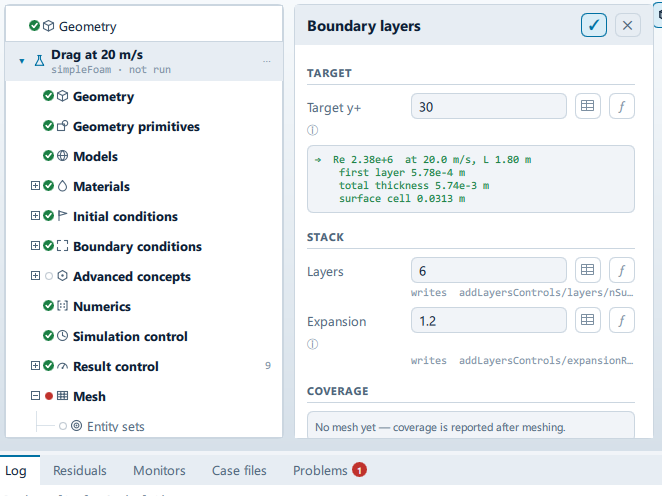
Where it is
Setup tree: Mesh > Boundary layers
Controls
Target
Target y+
- Control: value (
ValueField) - Default:
30 - Bound to:
CaseState.targetYPlus
The in-app guidance depends on the case:
- This case is laminar, so there are no wall functions and y+ means nothing to the solver. It still sets the first layer thickness here - if you want layers at all, size them against the flow feature you are resolving instead.
- Resolved wall treatment needs y+ ≈ 1.
- Wall functions want y+ between 30 and 300.
Stack
Layers
- Control: value (
ValueField) - Default:
6 - Bound to:
CaseState.nLayers - Writes:
addLayersControls/layers/nSurfaceLayers
Expansion
- Control: value (
ValueField) - Default:
1.2 - Bound to:
CaseState.expansionRatio - Writes:
addLayersControls/expansionRatio
1.1 to 1.3. Higher stacks reach the surface cell faster but grow the aspect ratio.
Medial axis
Thickness / medial distance
- Control: value (
ValueField) - Default:
0.3 - Bound to:
CaseState.maxThicknessToMedialRatio - Writes:
addLayersControls/… - Value modes: none (plain entry)
- Shown when:
CaseState.nLayers > 0
Min medial axis angle
- Control: value (
ValueField) - Default:
90 - Bound to:
CaseState.minMedialAxisAngle - Writes:
addLayersControls/… - Value modes: none (plain entry)
- Shown when:
CaseState.nLayers > 0
Feature angle
- Control: value (
ValueField) - Default:
60 - Bound to:
CaseState.layerFeatureAngle - Writes:
addLayersControls/… - Value modes: none (plain entry)
- Shown when:
CaseState.nLayers > 0
Layer iterations
- Control: value (
ValueField) - Default:
50 - Bound to:
CaseState.nLayerIter - Writes:
addLayersControls/… - Value modes: none (plain entry)
- Shown when:
CaseState.nLayers > 0
Take the layers off
Label changes with the case; the source gives these forms: Take the layers off, Add layers and grow them more slowly.
- Control: action (
ToolButton2) - Shown when:
CaseState.meshExists && CaseState.layerCoverage < 0.7
Layer placement
Min thickness factor
- Control: value (
ValueField) - Default:
0.25 - Bound to:
CaseState.minThicknessFactor - Value modes: none (plain entry)
Max face thickness ratio
- Control: value (
ValueField) - Default:
0.5 - Bound to:
CaseState.maxFaceThicknessRatio - Value modes: none (plain entry)
Grow layers
- Control: value (
ValueField) - Default:
0 - Bound to:
CaseState.nGrow - Value modes: none (plain entry)
Relax iterations
- Control: value (
ValueField) - Default:
5 - Bound to:
CaseState.nLayerRelaxIter - Value modes: none (plain entry)
Smooth surface normals
- Control: value (
ValueField) - Default:
1 - Bound to:
CaseState.nSmoothSurfaceNormals - Value modes: none (plain entry)
Smooth normals
- Control: value (
ValueField) - Default:
3 - Bound to:
CaseState.nSmoothNormals - Value modes: none (plain entry)
Smooth thickness
- Control: value (
ValueField) - Default:
10 - Bound to:
CaseState.nSmoothThickness - Value modes: none (plain entry)
Buffer cells
- Control: value (
ValueField) - Default:
0 - Bound to:
CaseState.nBufferCellsNoExtrude - Value modes: none (plain entry)
Meshing…
Label changes with the case; the source gives these forms: Meshing…, Generate mesh.
- Control: action (
ToolButton2) - Enabled when:
CaseState.meshState !== "meshing"
Problems reported against this step
The application checks these before a run and reports them in the Problems tab against this step.
| Severity | Message |
|---|---|
| warn | …% on patch 'body'. That is low enough that the stack is costing mesh quality rather than buying wall resolution - compare checkMesh with the …% on patch 'body' - below the 70% target. |
| warn | Resolved wall treatment needs y+ of about 1; the target is …. |
| warn | Resolved wall treatment needs the first cell at y+ of about 1, and nothing in this case sets that: with no boundary layers the first cell height is whatever the mesh gives, and target y+ does not describe it. Check the y+ result control after the run - too far out and this treatment is badly wrong, not slightly. |
| warn | Wall functions want the first cell centre in the log region, about 30 < y+ < 300; the target is …. Consider the resolved treatment. |
… marks a value the application computes at run time, so the source carries no fixed text for it.