
Draft. This manual is new and still growing. If something here does not match what you see in the software, the software is right — tell us and we will fix the page.
Boundary conditions
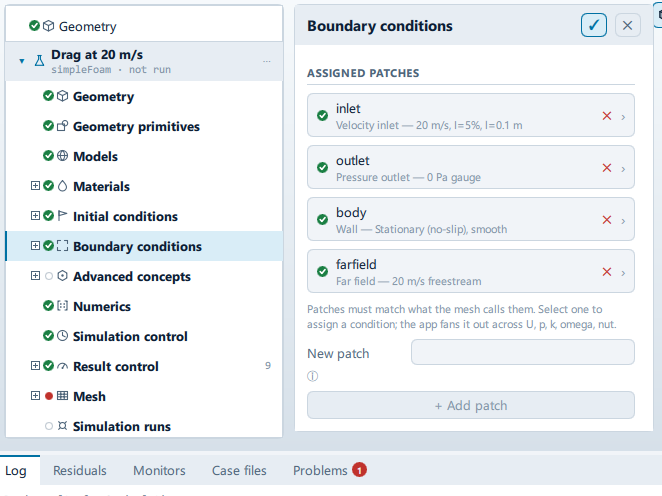
Where it is
Setup tree: Boundary conditions
Controls
Assigned patches
Use the mesh's patches
- Control: action (
ToolButton2) - Shown when:
Results.ready && !CaseState.patchesMatchMesh
New patch
- Control: value (
ValueField) - Value modes: none (plain entry)
Named as the solver will see it — letters, digits and underscores.
+ Add patch
- Control: action (
ToolButton2) - Enabled when:
listRoot.pendingName !== "" && CaseState.patchNameIssue(listRoot.pendingName, -1) === ""
Problems reported against this step
The application checks these before a run and reports them in the Problems tab against this step.
| Severity | Message |
|---|---|
| error | Nothing brings water into the domain: no patch is a wave inlet and none is an inlet. Set one, or the run solves a tank of still water. |
| info | Nothing on the boundary fixes the pressure level, so pRefCell 0 and pRefValue 0 are written into fvSolution to pin it. Only differences in pressure mean anything in a closed domain. |
| warn | … not in the mesh, so what is set on … will have no effect. The mesh has: …. |
| error | This case is set to two-dimensional but no patch is Empty (2D), so the solver will treat it as 3D. The side faces have to be empty for the direction to be dropped. |
| error | An axisymmetric case needs exactly two wedge patches, one each side of the axis. This case has …. |
| error | A case cannot be both two-dimensional and axisymmetric - empty and wedge patches are alternative ways of removing the same direction. |
… marks a value the application computes at run time, so the source carries no fixed text for it.