
Draft. This manual is new and still growing. If something here does not match what you see in the software, the software is right — tell us and we will fix the page.
Study
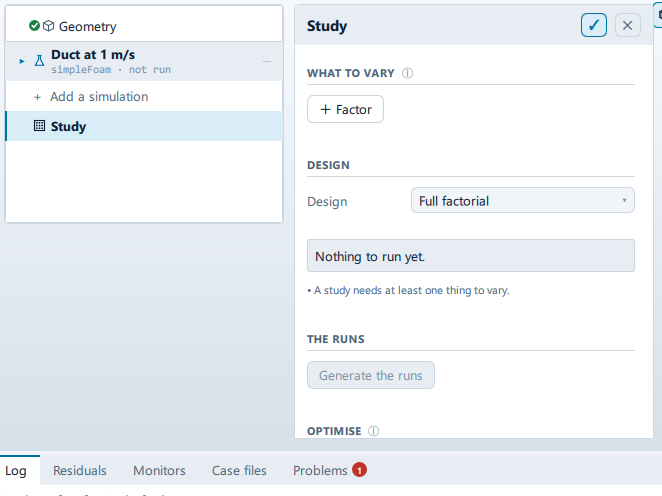
Where it is
Setup tree: Study
Controls
WHAT TO VARY
+ Factor
- Control: action (
ToolButton2)
DESIGN
Design
- Control: choice (
ComboRow)
Samples
- Control: value (
ValueField) - Value modes: none (plain entry)
- Shown when:
root.lhs
The in-app guidance depends on the case:
- The size of each base sample, NOT the number of runs — a Sobol design asks for this many times the number of factors plus two. The indices are differences of means, so below a few hundred they carry real noise.
- How many runs. A Latin hypercube covers the space in whatever number you choose, which is why it does not explode.
Seed
- Control: value (
ValueField) - Value modes: none (plain entry)
- Shown when:
root.lhs
Saved with the case. The same seed gives the same points on any machine — without that a study's results cannot be checked.
THE RUNS
Generate the runs
- Control: action (
ToolButton2) - Enabled when:
StudyState.solvable && StudyState.pointCount > 0 && root.allFactorsResolve
OPTIMISE
Goal
- Control: choice (
ComboRow) - Options:
Minimise the result,Maximise the result
Budget
- Control: value (
ValueField) - Value modes: none (plain entry)
The most runs the search may spend. Each one is a mesh and a solve, so this is a cost ceiling, not a quality knob.
Searching…
Label changes with the case; the source gives these forms: Searching…, Start the search.
- Control: action (
ToolButton2) - Enabled when:
!CaseState.optimisationRunning && root.allFactorsResolve && StudyState.factors.length > 0
Stop
- Control: action (
ToolButton2) - Shown when:
CaseState.optimisationRunning
THE SPREAD
Judge against a limit
- Control: on/off (
ToggleRow) - Shown when:
root.spreadResult !== null
The reliability question: what fraction of the plausible inputs put the answer past a threshold - a yield stress, a temperature rating, a drag target.
Limit
- Control: value (
ValueField) - Value modes: none (plain entry)
Beyond is
- Control: choice (
ComboRow) - Options:
Above it,Below it
Conditional and repeated groups
Per item in root.factorList
repeated once for every entry in root.factorList
Property
- Control: value (
ValueField) - Value modes: none (plain entry)
Nothing in the open study is called this. Dotted for nested values, e.g. structural.material.youngsModulus
✕
- Control: action (
ToolButton2)
Called
- Control: value (
ValueField) - Value modes: none (plain entry)
Unit
- Control: value (
ValueField) - Value modes: none (plain entry)
Values
- Control: value (
ValueField) - Value modes: none (plain entry)
A list — commas or spaces. Or leave it empty and give a range below.
Steps
- Control: value (
ValueField) - Value modes: none (plain entry)
A count of values, both ends included: 5 from 0 to 100 gives 0, 25, 50, 75, 100.
From
- Control: value (
ValueField) - Value modes: none (plain entry)
To
- Control: value (
ValueField) - Value modes: none (plain entry)
Sampled as
- Control: choice (
ComboRow) - Options:
Uniform,Normal - Shown when:
root.lhs
Mean
- Control: value (
ValueField) - Value modes: none (plain entry)
Std dev
- Control: value (
ValueField) - Value modes: none (plain entry)
The give-or-take. A normal factor is sampled by its own tails, so the bounds above are not used for it.
Problems reported against this step
The application reports no problems against this step.
… marks a value the application computes at run time, so the source carries no fixed text for it.