
Draft. This manual is new and still growing. If something here does not match what you see in the software, the software is right — tell us and we will fix the page.
Simulation control
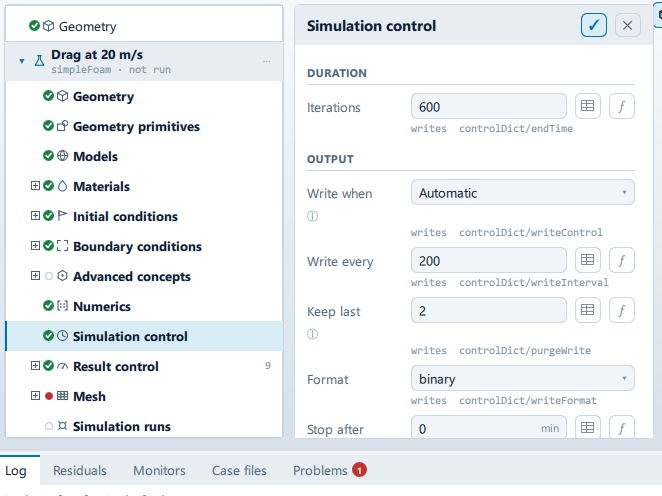
Where it is
Setup tree: Simulation control
Controls
Duration
Iterations
Label changes with the case; the source gives these forms: Iterations, End time.
- Control: value (
ValueField) - Unit: s
- Bound to:
CaseState.steady - Writes:
controlDict/endTime
Time step
- Control: value (
ValueField) - Unit: s
- Default:
0.001 - Bound to:
CaseState.deltaT - Writes:
controlDict/deltaT - Shown when:
!CaseState.steady
Adjust time step to Courant number
- Control: on/off (
ToggleRow) - Default:
true - Bound to:
CaseState.adjustTimeStep - Shown when:
!CaseState.steady
Max Courant
- Control: value (
ValueField) - Default:
1.0 - Bound to:
CaseState.maxCourantLimit - Writes:
controlDict/maxCo - Shown when:
!CaseState.steady && CaseState.adjustTimeStep
The in-app guidance depends on the case:
- PISO is held at 0.5: it has no outer corrector, so a step it cannot resolve is not iterated back. PIMPLE tolerates 5-10.
- PIMPLE with outer correctors tolerates 5-10; without them, keep it near 1.
Max time step
- Control: value (
ValueField) - Unit: s
- Default:
0.01 - Bound to:
CaseState.maxDeltaT - Writes:
controlDict/maxDeltaT - Shown when:
!CaseState.steady && CaseState.adjustTimeStep
Output
Write when
- Control: choice (
ComboRow) - Default:
Automatic - Bound to:
CaseState.writeControlMode - Options:
Automatic,timeStep,runTime,adjustableRunTime,clockTime,cpuTime(fromCaseState.writeControlModes) - Writes:
controlDict/writeControl
Automatic writes by step on a steady run and by simulated time on a transient one. Clock and CPU time are how you get output from a run you are watching rather than one you have measured.
Write every
- Control: value (
ValueField) - Default:
100 - Bound to:
CaseState.writeInterval - Writes:
controlDict/writeInterval
Keep last
- Control: value (
ValueField) - Default:
3 - Bound to:
CaseState.purgeWrite - Writes:
controlDict/purgeWrite
The in-app guidance depends on the case:
- Every write is kept.
- Older writes are deleted as the run goes, so only the last … survive. Zero keeps them all, which is what an animation of a transient run needs.
Format
- Control: choice (
ComboRow) - Default:
binary - Bound to:
CaseState.writeFormat - Options:
binary,ascii - Writes:
controlDict/writeFormat
Stop after
- Control: value (
ValueField) - Unit: min
- Default:
0 - Bound to:
CaseState.maxRuntimeMinutes
Wall-clock ceiling on the solve. Zero for none. The run is asked to stop and write, not killed.
Parallel
Cores
- Control: choice (
ComboRow) - Default:
16 - Bound to:
CaseState.cores - Writes:
decomposeParDict/numberOfSubdomains
The in-app guidance depends on the case:
- This licence solves on one core. The run still completes; it takes longer.
- More cores split the mesh further. Below about 10 k cells per core the communication costs more than the arithmetic saves.
Decomposition
- Control: choice (
ComboRow) - Default:
scotch - Bound to:
CaseState.decomposition - Options:
scotch,hierarchical,simple,kahip,multiLevel,manual - Writes:
decomposeParDict/method
Split x
- Control: value (
ValueField) - Default:
0 - Bound to:
CaseState.decomposeNx - Writes:
decomposeParDict/coeffs/n - Value modes: none (plain entry)
- Shown when:
(CaseState.decomposition === "hierarchical" || CaseState.decomposition === "simple")
Zero means every rank along x, which is what this did before. Otherwise the three should multiply to the core count - decomposePar says so itself if they do not.
Split y
- Control: value (
ValueField) - Default:
1 - Bound to:
CaseState.decomposeNy - Writes:
decomposeParDict/coeffs/n - Value modes: none (plain entry)
- Shown when:
(CaseState.decomposition === "hierarchical" || CaseState.decomposition === "simple")
Zero means every rank along x, which is what this did before. Otherwise the three should multiply to the core count - decomposePar says so itself if they do not.
Split z
- Control: value (
ValueField) - Default:
1 - Bound to:
CaseState.decomposeNz - Writes:
decomposeParDict/coeffs/n - Value modes: none (plain entry)
- Shown when:
(CaseState.decomposition === "hierarchical" || CaseState.decomposition === "simple")
Zero means every rank along x, which is what this did before. Otherwise the three should multiply to the core count - decomposePar says so itself if they do not.
Split order
- Control: choice (
ComboRow) - Default:
xyz - Bound to:
CaseState.decomposeOrder - Options:
xyz,xzy,yxz,yzx,zxy,zyx - Writes:
decomposeParDict/coeffs/order - Shown when:
CaseState.decomposition === "hierarchical"
Which direction hierarchical splits first.
Executor
Run on
- Control: choice (
ComboRow) - Default:
Bundled solver - Bound to:
CaseState.executor - Options:
Bundled solver,SHD Cloud,Remote SSH
The in-app guidance depends on the case:
- The whole pipeline runs on the remote host: mesh, initialisation and solver, with the results fetched back.
- … at …
Machine
- Control: choice (
ComboRow) - Default: empty
- Bound to:
CaseState.remoteMachine - Shown when:
CaseState.runsSshRemote
Configured under Settings > Machines.
Problems reported against this step
The application checks these before a run and reports them in the Problems tab against this step.
| Severity | Message |
|---|---|
| warn | This run writes about … times and "Keep last" is …, so all but the final … are deleted as it goes. Set it to zero to keep every frame. |
| warn | The … tier solves on …, so this run will use … of the … requested and take longer. Upgrading uses the whole machine. |
| error | Running on a remote machine is not part of the … tier. Choose the bundled runtime, or upgrade. |
| error | Starting from an earlier result is not part of the … tier. Initialise from the field values instead, or upgrade — the run itself is not limited, only the head start. |
| warn | … k cells per core - above the efficient 30-100 k range. Consider more cores. |
| warn | … k cells per core - communication will dominate. Consider fewer cores. |
… marks a value the application computes at run time, so the source carries no fixed text for it.