
Draft. This manual is new and still growing. If something here does not match what you see in the software, the software is right — tell us and we will fix the page.
Mesh
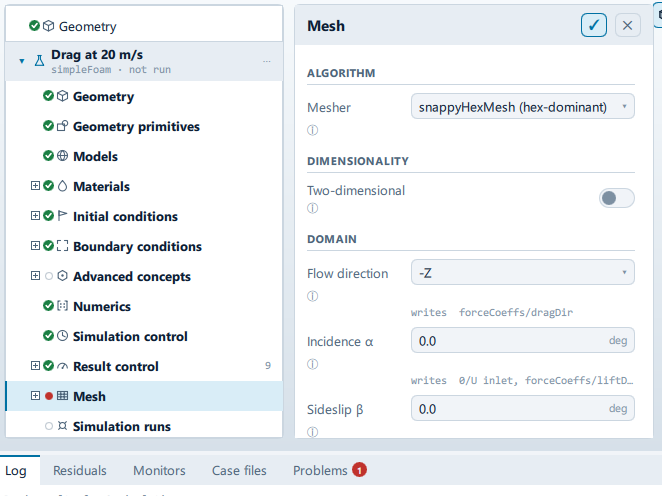
Where it is
Setup tree: Mesh
Controls
Algorithm
Mesher
- Control: choice (
ComboRow) - Default:
snappyHexMesh (hex-dominant) - Bound to:
CaseState.mesher - Options:
snappyHexMesh (hex-dominant),blockMesh only (no body),Import an existing mesh(fromCaseState.mesherOptions)
The in-app guidance depends on the case:
- This leaf fills an enclosed vessel straight from a single blockMesh box - there is no imported body to wrap a surface mesh onto, so snappyHexMesh never actually runs here, whatever this combo shows.
- The background block is the whole domain. Right for internal flow - a duct, a room, a manifold - where there is no body to wrap a mesh around.
- Convert a mesh from another tool instead of generating one. Choose the file below.
- Wraps a hex-dominant mesh onto the imported body, with refinement regions and boundary layers.
Dimensionality
Two-dimensional
- Control: on/off (
ToggleRow) - Default:
false - Bound to:
CaseState.twoDimensional
There is no 2D solver. A 2D case is a mesh one cell thick with the two side faces declared empty, and the solver then drops that direction entirely. Roughly a hundred times cheaper than the 3D equivalent, which is why so much everyday CFD is 2D.
Thin direction
- Control: choice (
ComboRow) - Default:
z - Bound to:
CaseState.twoDAxis - Options:
x,y,z - Shown when:
CaseState.twoDimensional && !CaseState.enclosedVessel
The direction removed from the model. It cannot be the flow direction, which is the one the answer is in.
Mesh file
Choose mesh
- Control: action (
ToolButton2)
Source format
- Control: choice (
ComboRow) - Default: empty
- Bound to:
CaseState.importedMeshConverter
Detection is right nearly always. Set it by hand for .msh, which Fluent, Gmsh and others all use for different formats.
Mesh units
- Control: choice (
ComboRow) - Bound to:
CaseState.meshImportScales - Options:
metres,millimetres,centimetres,inches,feet(fromCaseState.meshImportScales)
What the numbers in the file are in. Everything downstream works in metres, so a mesh exported in millimetres and left as one solves a model a thousand times too big.
Stop meshing
- Control: action (
ToolButton2) - Shown when:
JobExecutor.busy && CaseState.meshState === "meshing"
Domain
Flow direction
- Control: choice (
ComboRow) - Default:
-Z - Bound to:
CaseState.flowAxis - Options:
+X,-X,+Y,-Y,+Z,-Z(fromCaseState.flowAxisOptions) - Writes:
forceCoeffs/dragDir
Sets the reference length and frontal area, the wind-tunnel pads, the inlet and outlet patches, and the drag direction.
Incidence α
- Control: value (
ValueField) - Unit: deg
- Default:
0 - Bound to:
CaseState.incidenceAlpha - Writes:
0/U inlet, forceCoeffs/liftDir and dragDir - Value modes: none (plain entry)
Nose-up positive. Applied to the oncoming flow rather than to the body, so a sweep reuses one mesh: run the same case at a few angles and the force coefficients become curves, which is what says whether the vehicle is stable rather than just how much it drags. Lift and drag are resolved along the tilted stream, not the tunnel axis.
Sideslip β
- Control: value (
ValueField) - Unit: deg
- Default:
0 - Bound to:
CaseState.incidenceBeta - Writes:
0/U inlet - Value modes: none (plain entry)
Nose-to-starboard positive. For a towed body this is the yaw the tow point imposes in a turn.
Auto wind tunnel
- Control: on/off (
ToggleRow) - Default:
true - Bound to:
CaseState.domainAuto - Shown when:
!domainFrom.usesPrimitive
Sizes the background block from the geometry bounding box, in multiples of body length. Turn off to enter the box explicitly, or to drag it in the viewport.
Min X
- Control: value (
ValueField) - Unit: m
- Writes:
blockMeshDict/vertices - Value modes: none (plain entry)
- Shown when:
(CaseState.domainAuto || domainFrom.usesPrimitive)
Min Y
- Control: value (
ValueField) - Unit: m
- Writes:
blockMeshDict/vertices - Value modes: none (plain entry)
- Shown when:
(CaseState.domainAuto || domainFrom.usesPrimitive)
Min Z
- Control: value (
ValueField) - Unit: m
- Writes:
blockMeshDict/vertices - Value modes: none (plain entry)
- Shown when:
(CaseState.domainAuto || domainFrom.usesPrimitive)
Max X
- Control: value (
ValueField) - Unit: m
- Writes:
blockMeshDict/vertices - Value modes: none (plain entry)
- Shown when:
(CaseState.domainAuto || domainFrom.usesPrimitive)
Max Y
- Control: value (
ValueField) - Unit: m
- Writes:
blockMeshDict/vertices - Value modes: none (plain entry)
- Shown when:
(CaseState.domainAuto || domainFrom.usesPrimitive)
Max Z
- Control: value (
ValueField) - Unit: m
- Writes:
blockMeshDict/vertices - Value modes: none (plain entry)
- Shown when:
(CaseState.domainAuto || domainFrom.usesPrimitive)
Fluid region
Seed point automatic
- Control: on/off (
ToggleRow) - Default:
true - Bound to:
CaseState.meshSeedAuto - Writes:
snappyHexMeshDict/castellatedMeshControls/locationInMesh
Where snappyHexMesh is told the fluid is. Automatic places the point above the body, outside it. For a flow inside an imported shell - a rotor in a casing, a tank - turn this off and put the point in the fluid inside the shell; the mesh outside is discarded.
Seed X
- Control: value (
ValueField) - Unit: m
- Writes:
snappyHexMeshDict/castellatedMeshControls/locationInMesh - Value modes: none (plain entry)
- Shown when:
CaseState.meshSeedAuto
Seed Y
- Control: value (
ValueField) - Unit: m
- Writes:
snappyHexMeshDict/castellatedMeshControls/locationInMesh - Value modes: none (plain entry)
- Shown when:
CaseState.meshSeedAuto
Seed Z
- Control: value (
ValueField) - Unit: m
- Writes:
snappyHexMeshDict/castellatedMeshControls/locationInMesh - Value modes: none (plain entry)
- Shown when:
CaseState.meshSeedAuto
Sealed fluid
- Control: on/off (
ToggleRow) - Default:
false - Bound to:
CaseState.closedDomain - Writes:
fvSolution/PIMPLE/pRefCell
No opening fixes the pressure level - the fluid is enclosed by walls and the interface. Writes a reference cell (pRefCell), without which the solver stops at start-up. On when the seed point is inside a shell with no inlet or outlet of its own.
Base mesh
Base cell size
- Control: value (
ValueField) - Unit: m
- Default:
0.08 - Bound to:
CaseState.baseCellSize - Writes:
blockMeshDict/blocks
Suggest from domain
- Control: action (
ToolButton2)
Generate
Meshing…
Label changes with the case; the source gives these forms: Meshing…, Generate mesh.
- Control: action (
ToolButton2) - Enabled when:
CaseState.meshState !== "meshing"
Problems reported against this step
The application checks these before a run and reports them in the Problems tab against this step.
| Severity | Message |
|---|---|
| error | |
| error | The flow axis is vertical on a free-surface case. The surface is horizontal, so the inlet on the … face drives the flow straight through it. Set the flow axis to X or Y. |
| warn | The wave is … m tall and the base cell is … m, so the free surface has about … cells through it. It needs roughly eight to hold its shape across a … m wavelength. Reduce the base cell, or add a refinement region over the still-water level. |
| error | Waves have to travel along X. The wave library builds the inlet's local frame from the transpose of the rotation it means to use, which is only harmless where that frame is the identity - Z up, and the wave inlet facing along X. On any other axis it either crashes the solver or sends the wave the wrong way. |
| error | No mesh has been generated. |
| error | The thin direction of a 2D case cannot be the flow direction - that is the direction the answer is in. Choose a different axis. |
| warn | The geometry is … m across the thin direction, which is no more than the … m slab the 2D mesh is. The body has to reach past both side faces for the flow to be two-dimensional; extend it along …. Force coefficients are reported on the imported frontal area until it does. |
| error | This case is two-dimensional along …, which is also the flow direction. The thin faces would be the inlet and the outlet rather than the empty pair, so nothing about the mesh would be two-dimensional. Choose a thin axis across the flow. |
| error | The mesher is set to import a mesh, but no mesh file has been chosen. |
| error | No converter in this build reads …. Choose the source format explicitly. |
| … | … cells, over the … tier's limit of …. The estimate is a projection and snappyHexMesh routinely lands well under it, so mesh it and the … cells and the … tier is limited to …. Coarsen the mesh, or upgrade to remove the limit. |
… marks a value the application computes at run time, so the source carries no fixed text for it.