
Draft. This manual is new and still growing. If something here does not match what you see in the software, the software is right — tell us and we will fix the page.
Quality
This step mostly reads rather than writes. Its figures come from the report
checkMesh produced for the mesh currently on disk, and its recommendations
point at the steps that do change the case — Numerics and Boundary layers.
Two controls here do change the case, and they are the reason the panel is not
purely a read-out. Apply to mesh settings takes the layer recommendation and
writes it into the boundary-layer settings for you. Acceptance criteria are
what the mesher rejects its own work against: OpenFOAM's defaults, editable, and
worth touching only once checkMesh has told you which criterion is failing.
Mesh again and re-check runs the whole meshing pipeline, not a bare
checkMesh — on a case with layers that is minutes, not seconds.
Because the figures come from the last mesh that was generated, they say nothing about settings you have edited since. Regenerate the mesh before trusting them.
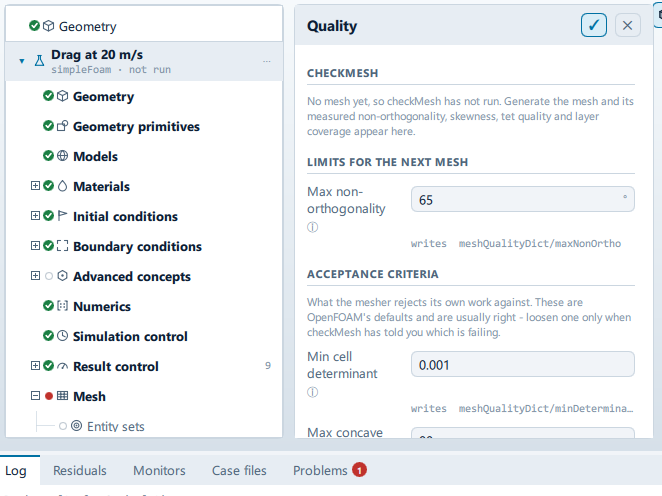
Where it is
Setup tree: Mesh > Quality
Controls
Limits for the next mesh
Max non-orthogonality
- Control: value (
ValueField) - Unit: °
- Default:
65 - Bound to:
CaseState.nonOrthoLimit - Writes:
meshQualityDict/maxNonOrtho - Value modes: none (plain entry)
- Shown when:
!CaseState.meshIsBlockMeshAlone
The mesher rejects a cell worse than this. 65 is the standard default; above 70 the solver needs extra non-orthogonal correctors, which it is given automatically.
Acceptance criteria
Min cell determinant
- Control: value (
ValueField) - Default:
0.001 - Bound to:
CaseState.minDeterminant - Writes:
meshQualityDict/… - Value modes: none (plain entry)
- Shown when:
CaseState.meshIsBlockMeshAlone
Max concave angle
- Control: value (
ValueField) - Default:
80 - Bound to:
CaseState.maxConcave - Writes:
meshQualityDict/… - Value modes: none (plain entry)
- Shown when:
CaseState.meshIsBlockMeshAlone
Max internal skewness
- Control: value (
ValueField) - Default:
4 - Bound to:
CaseState.maxInternalSkewness - Writes:
meshQualityDict/… - Value modes: none (plain entry)
- Shown when:
CaseState.meshIsBlockMeshAlone
Max boundary skewness
- Control: value (
ValueField) - Default:
20 - Bound to:
CaseState.maxBoundarySkewness - Writes:
meshQualityDict/… - Value modes: none (plain entry)
- Shown when:
CaseState.meshIsBlockMeshAlone
Min face twist
- Control: value (
ValueField) - Default:
0.02 - Bound to:
CaseState.minTwist - Writes:
meshQualityDict/… - Value modes: none (plain entry)
- Shown when:
CaseState.meshIsBlockMeshAlone
Min face weight
- Control: value (
ValueField) - Default:
0.05 - Bound to:
CaseState.minFaceWeight - Writes:
meshQualityDict/… - Value modes: none (plain entry)
- Shown when:
CaseState.meshIsBlockMeshAlone
Min volume ratio
- Control: value (
ValueField) - Default:
0.01 - Bound to:
CaseState.minVolRatio - Writes:
meshQualityDict/… - Value modes: none (plain entry)
- Shown when:
CaseState.meshIsBlockMeshAlone
Recommendations
Apply to numerics
- Control: action (
ToolButton2)
Apply to mesh settings
- Control: action (
ToolButton2)
Mesh again and re-check
Label changes with the case; the source gives these forms: Mesh again and re-check, Generate the mesh.
- Control: action (
ToolButton2)
Lists this panel shows
Read straight from the data behind the panel, not from a hand-written list.
checkMesh
From a fixed list in the application.
| metric | limit |
|---|---|
| Cells | |
| Max non-orthogonality | < 70° |
| Max skewness | < 4 |
| Max aspect ratio | < 100 |
| Min tet quality (limit) | OpenFOAM default 1e-15 |
| Negative volumes | 0 |
| Layer coverage (body) | > 70% |
Problems reported against this step
The application checks these before a run and reports them in the Problems tab against this step.
| Severity | Message |
|---|---|
| error | … cell(s) with zero or negative volume - the pressure solve will diverge on its first iteration. Reduce the surface refinement or mesh in 3-D. |
| error | Max non-orthogonality … deg exceeds 70 - the run is likely to diverge. |
| warn | Max non-orthogonality … deg - schemes set to 'limited 0.5' with 1 non-orthogonal corrector. |
| error | The mesh has cells with an aspect ratio of … - they have been squashed flat, most likely by the boundary layers. The solver cannot use this mesh: the pressure equation diverges immediately. Reduce the layer count or the expansion ratio and mesh again. |
… marks a value the application computes at run time, so the source carries no fixed text for it.