
Draft. This manual is new and still growing. If something here does not match what you see in the software, the software is right — tell us and we will fix the page.
Loads
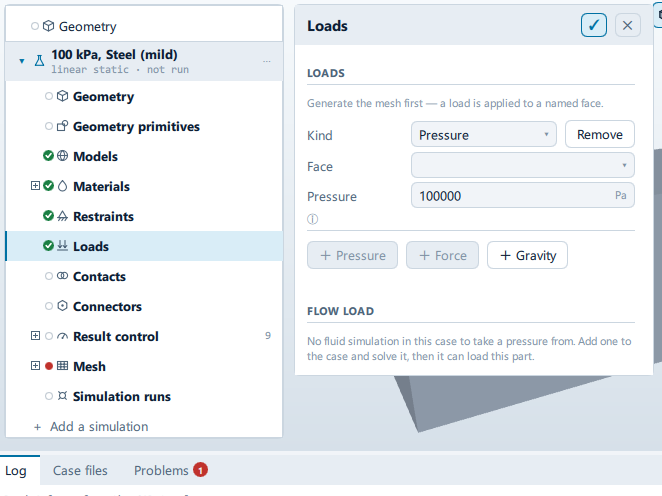
Where it is
Setup tree: Loads
Controls
LOADS
+ Pressure
- Control: action (
ToolButton2) - Shown when:
StructuralJob.meshKind !== "beam"
+ Force
- Control: action (
ToolButton2)
+ Gravity
- Control: action (
ToolButton2)
FLOW LOAD
From simulation
- Control: choice (
ComboRow) - Options: ``
Its patch
- Control: choice (
ComboRow) - Shown when:
StructuralState.flowSource !== ""
Onto face
- Control: choice (
ComboRow) - Shown when:
StructuralState.flowSource !== ""
Fluid density
- Control: value (
ValueField) - Unit: kg/m³
- Value modes: none (plain entry)
- Shown when:
StructuralState.flowSource !== ""
Only used if the run wrote kinematic pressure (p/rho). Water is about 1000, seawater 1025, air 1.2.
Mapping limit
- Control: value (
ValueField) - Unit: m
- Value modes: none (plain entry)
- Shown when:
StructuralState.flowSource !== ""
Refuse the run if a loaded face is further than this from any CFD face. Zero accepts whatever is nearest. Set it against the FLUID mesh spacing, not against zero.
Conditional and repeated groups
Per item in StructuralState.loads
repeated once for every entry in StructuralState.loads
Kind
- Control: choice (
ComboRow) - Options:
Pressure,Force,Gravity
Remove
- Control: action (
ToolButton2)
Face
Label changes with the case; the source gives these forms: Face, Group.
- Control: choice (
ComboRow) - Shown when:
!isGravity
Acceleration
- Control: value (
ValueField) - Value modes: none (plain entry)
X
- Control: value (
ValueField) - Value modes: none (plain entry)
Y
- Control: value (
ValueField) - Value modes: none (plain entry)
Z
- Control: value (
ValueField) - Value modes: none (plain entry)
Problems reported against this step
The application reports no problems against this step.
… marks a value the application computes at run time, so the source carries no fixed text for it.