
Draft. This manual is new and still growing. If something here does not match what you see in the software, the software is right — tell us and we will fix the page.
Result control
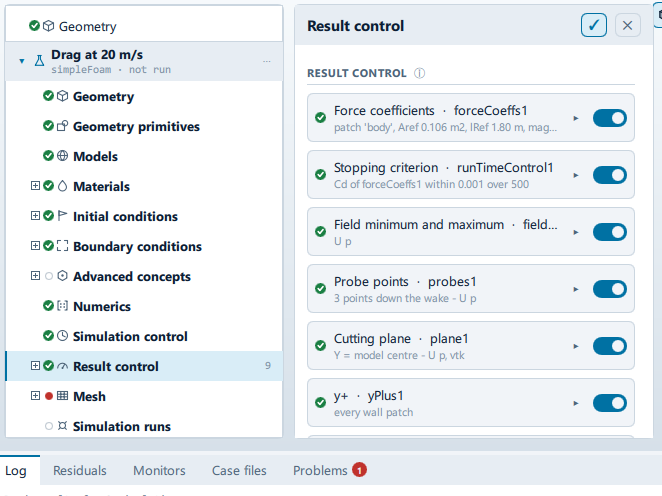
Where it is
Setup tree: Result control
Controls
Add
+ Force coefficients
- Control: action (
ToolButton2)
+ Forces and moments
- Control: action (
ToolButton2)
+ Probe points
- Control: action (
ToolButton2)
+ Cutting plane
- Control: action (
ToolButton2)
+ Patch data
- Control: action (
ToolButton2)
+ Volume data
- Control: action (
ToolButton2)
+ Field minimum and maximum
- Control: action (
ToolButton2)
+ y+
- Control: action (
ToolButton2)
+ Wall shear stress
- Control: action (
ToolButton2)
+ Wall heat flux
- Control: action (
ToolButton2)
+ Force distribution
- Control: action (
ToolButton2)
+ Flow rate through a patch
- Control: action (
ToolButton2)
+ Time averaging
- Control: action (
ToolButton2)
+ Stopping criterion
- Control: action (
ToolButton2)
+ Parcel cloud
- Control: action (
ToolButton2)
+ Interface height
- Control: action (
ToolButton2)
+ Vortex cores (Q)
- Control: action (
ToolButton2)
+ Total-pressure loss
- Control: action (
ToolButton2)
+ Mixing index
- Control: action (
ToolButton2)
+ Bed (mudline) height
- Control: action (
ToolButton2)
+ Velocity distribution
- Control: action (
ToolButton2)
+ Mean age of fluid
- Control: action (
ToolButton2)
+ Total pressure
- Control: action (
ToolButton2)
+ Pressure coefficient
- Control: action (
ToolButton2)
+ Thermal comfort
- Control: action (
ToolButton2)
+ Turbulence fields
- Control: action (
ToolButton2)
+ Aeroacoustic sources
- Control: action (
ToolButton2)
Conditional and repeated groups
Per item in CaseState.resultControls
repeated once for every entry in CaseState.resultControls
Name
- Control: value (
ValueField) - Value modes: none (plain entry)
Names the directory under postProcessing/.
Patch
- Control: choice (
ComboRow) - Shown when:
["forceCoeffs", "forces", "patchData", "totalPressureLoss"] .indexOf(rcRow.model.kind) >= 0
Downstream patch
- Control: choice (
ComboRow) - Default: empty
- Shown when:
rcRow.model.kind === "totalPressureLoss"
References from the case
- Control: on/off (
ToggleRow) - Default:
true - Shown when:
rcRow.model.kind === "forceCoeffs"
Frontal area, model length and inlet speed as the geometry and the boundary conditions have them.
Reference area (m²)
- Control: value (
ValueField) - Default:
1 - Value modes: none (plain entry)
- Shown when:
rcRow.model.kind === "forceCoeffs" && !rcRow.model.refAuto
Reference length (m)
- Control: value (
ValueField) - Default:
1 - Value modes: none (plain entry)
- Shown when:
rcRow.model.kind === "forceCoeffs" && !rcRow.model.refAuto
Reference speed (m/s)
- Control: value (
ValueField) - Default:
10 - Value modes: none (plain entry)
- Shown when:
rcRow.model.kind === "forceCoeffs" && !rcRow.model.refAuto
Moments about the model centre
- Control: on/off (
ToggleRow) - Default:
true - Shown when:
["forceCoeffs", "forces"].indexOf(rcRow.model.kind) >= 0
Off to give the centre of rotation directly.
Observer from the geometry
- Control: on/off (
ToggleRow) - Default:
true - Shown when:
rcRow.model.kind === "aeroacoustics"
Twenty body lengths above the centre, which is inside the compact-source assumption Curle is built on. Turn it off to listen somewhere else.
Observer X
- Control: value (
ValueField) - Unit: m
- Default:
0 - Writes:
functions/observerPositions - Value modes: none (plain entry)
- Shown when:
rcRow.model.kind === "aeroacoustics" && !rcRow.model.obsAuto && String(rcRow.model.obsPrimitive || "") === ""
Observer Y
- Control: value (
ValueField) - Unit: m
- Default:
0 - Writes:
functions/observerPositions - Value modes: none (plain entry)
- Shown when:
rcRow.model.kind === "aeroacoustics" && !rcRow.model.obsAuto && String(rcRow.model.obsPrimitive || "") === ""
Observer Z
- Control: value (
ValueField) - Unit: m
- Default:
0 - Writes:
functions/observerPositions - Value modes: none (plain entry)
- Shown when:
rcRow.model.kind === "aeroacoustics" && !rcRow.model.obsAuto && String(rcRow.model.obsPrimitive || "") === ""
Centre of rotation X
- Control: value (
ValueField) - Unit: m
- Default:
0 - Value modes: none (plain entry)
- Shown when:
["forceCoeffs", "forces"].indexOf(rcRow.model.kind) >= 0 && !rcRow.model.cofrAuto && String(rcRow.model.cofrPrimitive || "") === ""
Centre of rotation Y
- Control: value (
ValueField) - Unit: m
- Default:
0 - Value modes: none (plain entry)
- Shown when:
["forceCoeffs", "forces"].indexOf(rcRow.model.kind) >= 0 && !rcRow.model.cofrAuto && String(rcRow.model.cofrPrimitive || "") === ""
Centre of rotation Z
- Control: value (
ValueField) - Unit: m
- Default:
0 - Value modes: none (plain entry)
- Shown when:
["forceCoeffs", "forces"].indexOf(rcRow.model.kind) >= 0 && !rcRow.model.cofrAuto && String(rcRow.model.cofrPrimitive || "") === ""
Placement
- Control: choice (
ComboRow) - Default:
Wake - Options:
Wake,Primitives,Custom - Shown when:
rcRow.model.kind === "probes"
Primitives probes at named Point primitives, so a probe moves when the point it names moves. Wake spaces them off the back of the model along the flow, in model lengths. Custom takes typed coordinates.
Points
- Control: value (
ValueField) - Default:
3 - Value modes: none (plain entry)
- Shown when:
rcRow.model.kind === "probes" && rcRow.model.probeMode === "Wake"
Locations
- Control: value (
ValueField) - Default:
(0 0 0) - Value modes: none (plain entry)
- Shown when:
rcRow.model.kind === "probes" && rcRow.model.probeMode === "Custom"
Syntax: (0 0 0) (1 0 0)
Normal
- Control: choice (
ComboRow) - Default:
Y - Options:
X,Y,Z - Shown when:
rcRow.model.kind === "cuttingPlane"
Through the model centre
- Control: on/off (
ToggleRow) - Default:
true - Shown when:
rcRow.model.kind === "cuttingPlane"
Offset (m)
- Control: value (
ValueField) - Default:
0 - Value modes: none (plain entry)
- Shown when:
rcRow.model.kind === "cuttingPlane" && !rcRow.model.planeOffsetAuto && !planeFrom.usesPrimitive
Format
- Control: choice (
ComboRow) - Default:
vtk - Options:
vtk,raw,ensight,foam - Shown when:
rcRow.model.kind === "cuttingPlane"
Operation
- Control: choice (
ComboRow) - Options:
sum,areaAverage,areaIntegrate,min,max,areaNormalIntegrate - Shown when:
rcRow.model.kind === "patchData"
sum of phi over an inlet or outlet is its volumetric flow.
Operation
- Control: choice (
ComboRow) - Options:
volAverage,volIntegrate,sum,min,max - Shown when:
rcRow.model.kind === "volumeData"
Start at
- Control: value (
ValueField) - Default:
0 - Value modes: none (plain entry)
- Shown when:
rcRow.model.kind === "fieldAverage"
The in-app guidance depends on the case:
- Iteration to start averaging from.
- Time in seconds to start from.
Variance as well as mean
- Control: on/off (
ToggleRow) - Default:
true - Shown when:
rcRow.model.kind === "fieldAverage"
Watching
- Control: value (
ValueField) - Default:
forceCoeffs1 - Value modes: none (plain entry)
- Shown when:
rcRow.model.kind === "runTimeControl"
The name of another item on this list - a force coefficient item, usually.
Quantity
- Control: value (
ValueField) - Default:
Cd - Value modes: none (plain entry)
- Shown when:
rcRow.model.kind === "runTimeControl"
Tolerance
- Control: value (
ValueField) - Default:
0.001 - Value modes: none (plain entry)
- Shown when:
rcRow.model.kind === "runTimeControl"
Window
- Control: value (
ValueField) - Default:
500 - Value modes: none (plain entry)
- Shown when:
rcRow.model.kind === "runTimeControl"
Iterations the average is taken over.
Fields
- Control: value (
ValueField) - Value modes: none (plain entry)
- Shown when:
["probes", "cuttingPlane", "patchData", "volumeData", "fieldMinMax", "fieldAverage"] .indexOf(rcRow.model.kind) >= 0
Space separated, as the solver names them: U p k omega.
Only when the solver writes
- Control: on/off (
ToggleRow) - Shown when:
["yPlus", "wallShearStress", "fieldAverage", "runTimeControl"].indexOf(rcRow.model.kind) < 0
A sampled plane written at every time step is thousands of files and a run that spends its time on IO.
Write every
- Control: value (
ValueField) - Default:
1 - Value modes: none (plain entry)
- Shown when:
["yPlus", "wallShearStress", "fieldAverage", "runTimeControl"].indexOf(rcRow.model.kind) < 0 && !rcRow.model.atWriteTime
Time steps between writes.
Remove
- Control: action (
ToolButton2)
Problems reported against this step
The application checks these before a run and reports them in the Problems tab against this step.
| Severity | Message |
|---|---|
| error | Force coefficients are scaled by … m/s but the inlet is … m/s. Every coefficient would be out by a factor of …. |
| warn | … measures the patch "…", which this case does not have - most likely it was set up before the geometry was imported. It will not be written; pick one of: …. |
| error | Mean age of fluid needs an inlet to measure age from. This case has none, so the field would be uniform rather than wrong in a way you could see. |
| error | Thermal comfort is assessed from the air temperature, and this case does not solve for one. Turn the energy equation on, or take the control off. |
| error | Turbulence fields has nothing to write on a laminar case: there is no model to ask for k, epsilon or the Reynolds stress. |
… marks a value the application computes at run time, so the source carries no fixed text for it.