
Draft. This manual is new and still growing. If something here does not match what you see in the software, the software is right — tell us and we will fix the page.
Refinements
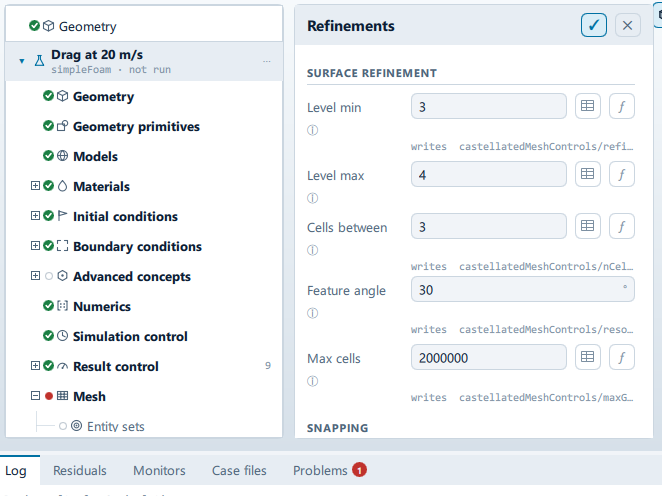
Where it is
Setup tree: Mesh > Refinements
Controls
Surface refinement
Level min
- Control: value (
ValueField) - Default:
3 - Bound to:
CaseState.surfaceLevelMin - Writes:
castellatedMeshControls/refinementSurfaces/body/level
Every cell touching the surface reaches this level.
Level max
- Control: value (
ValueField) - Default:
4 - Bound to:
CaseState.surfaceLevelMax
Reached where the surface curves more sharply than the feature angle.
Cells between
- Control: value (
ValueField) - Default:
3 - Bound to:
CaseState.nCellsBetweenLevels - Writes:
castellatedMeshControls/nCellsBetweenLevels
Buffer cells between refinement levels. Higher is smoother and produces better quality, at more cells.
Feature angle
- Control: value (
ValueField) - Unit: °
- Default:
30 - Bound to:
CaseState.resolveFeatureAngle - Writes:
castellatedMeshControls/resolveFeatureAngle - Value modes: none (plain entry)
Which edges get chased down to the surface level. Lower it towards 20 for a body with shallow curvature that is being missed; raise it towards 60 when feature refinement is running the cell count away. The one member of this block that was not reachable.
Max cells
- Control: value (
ValueField) - Default:
2000000 - Bound to:
CaseState.maxGlobalCells - Writes:
castellatedMeshControls/maxGlobalCells
Hard budget. Refinement stops when it is reached, so the mesh may not achieve the levels above.
Snapping
Snap iterations
- Control: value (
ValueField) - Default:
30 - Bound to:
CaseState.nSolveIter - Writes:
snappyHexMeshDict/… - Value modes: none (plain entry)
Snap relax passes
- Control: value (
ValueField) - Default:
5 - Bound to:
CaseState.nSnapRelaxIter - Writes:
snappyHexMeshDict/… - Value modes: none (plain entry)
Feature snap iterations
- Control: value (
ValueField) - Default:
10 - Bound to:
CaseState.nFeatureSnapIter - Writes:
snappyHexMeshDict/… - Value modes: none (plain entry)
Patch smoothing passes
- Control: value (
ValueField) - Default:
3 - Bound to:
CaseState.nSmoothPatch - Writes:
snappyHexMeshDict/… - Value modes: none (plain entry)
Snap tolerance
- Control: value (
ValueField) - Default:
2.0 - Bound to:
CaseState.snapTolerance - Writes:
snappyHexMeshDict/… - Value modes: none (plain entry)
Max cells per rank
- Control: value (
ValueField) - Default:
1000000 - Bound to:
CaseState.maxLocalCells - Writes:
snappyHexMeshDict/… - Value modes: none (plain entry)
Min cells to refine
- Control: value (
ValueField) - Default:
10 - Bound to:
CaseState.minRefinementCells - Writes:
snappyHexMeshDict/… - Value modes: none (plain entry)
Max load unbalance
- Control: value (
ValueField) - Default:
0.10 - Bound to:
CaseState.maxLoadUnbalance - Writes:
snappyHexMeshDict/… - Value modes: none (plain entry)
Refinement regions
+ Add refinement region
- Control: action (
ToolButton2)
Conditional and repeated groups
Per item in CaseState.refinementRegions
repeated once for every entry in CaseState.refinementRegions
Shape
- Control: choice (
ComboRow) - Default:
box - Options:
box,sphere - Shown when:
!regionCard.usesPrimitive
Mode
- Control: choice (
ComboRow) - Default:
inside - Options:
inside,outside,distance - Writes:
refinementRegions/…/mode
Level
- Control: value (
ValueField) - Default:
2
Distance
- Control: value (
ValueField) - Unit: L
- Default:
1.0 - Shown when:
regionCard.region.mode === "distance"
Placement
- Control: choice (
ComboRow) - Options:
relative,absolute - Shown when:
!regionCard.usesPrimitive
The in-app guidance depends on the case:
- Metres in the case's axes.
- Body lengths off the geometry box, so it follows the model.
Ahead
- Control: value (
ValueField) - Unit: L
- Default:
1.0 - Shown when:
regionCard.regionShape === "box" && !regionCard.absolute
Wake
- Control: value (
ValueField) - Unit: L
- Default:
2.0 - Shown when:
regionCard.regionShape === "box" && !regionCard.absolute
Sides
- Control: value (
ValueField) - Unit: L
- Default:
1.0 - Shown when:
regionCard.regionShape === "box" && !regionCard.absolute
Above
- Control: value (
ValueField) - Unit: L
- Default:
1.0 - Shown when:
regionCard.regionShape === "box" && !regionCard.absolute
Below
- Control: value (
ValueField) - Unit: L
- Default:
1.0 - Shown when:
regionCard.regionShape === "box" && !regionCard.absolute
Problems reported against this step
The application reports no problems against this step.
… marks a value the application computes at run time, so the source carries no fixed text for it.